Exploring the realm of Top Cybersecurity Tools to Protect Digital Identity, this introduction sets the stage for a profound understanding of how to safeguard your digital presence. With a blend of informative insights and practical advice, readers are invited to embark on a journey towards heightened online security.
In the subsequent paragraphs, we will delve deeper into the intricacies of cybersecurity tools, antivirus software, password managers, multi-factor authentication, and virtual private networks, unravelling their pivotal roles in fortifying your digital identity.
Overview of Cybersecurity Tools
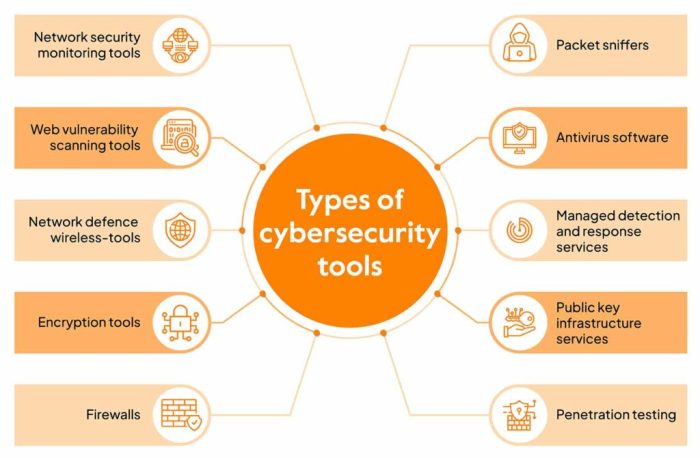
Cybersecurity tools play a crucial role in protecting our digital identities from various online threats and malicious activities. These tools are designed to prevent unauthorized access, detect suspicious behavior, and secure sensitive information from cyber attacks.
Key Features of Top Cybersecurity Tools
- Firewall Protection: Top cybersecurity tools offer advanced firewall protection to monitor and filter incoming and outgoing network traffic, blocking potential threats.
- Antivirus Software: These tools scan and remove malware, viruses, and other malicious software from devices to prevent data breaches and identity theft.
- Multi-factor Authentication: Top cybersecurity tools provide multi-factor authentication options to enhance security by requiring additional verification steps beyond passwords.
- Encryption: Secure encryption methods are used by these tools to protect sensitive data and communications from unauthorized access.
Categories of Cybersecurity Tools
- Vulnerability Scanners: These tools identify weaknesses in systems and networks that can be exploited by cybercriminals.
- Security Information and Event Management (SIEM) Tools: SIEM tools collect and analyze security event data to detect and respond to security incidents.
- Identity and Access Management (IAM) Solutions: IAM tools manage user identities and control access to systems, applications, and data.
- Endpoint Security Software: These tools protect individual devices such as laptops, smartphones, and tablets from cyber threats.
Antivirus Software
Antivirus software plays a crucial role in preventing cyber threats to digital identity by detecting and removing malicious software, such as viruses, ransomware, spyware, and other forms of malware that can compromise sensitive information.
Comparison of Antivirus Software Options
- Norton Antivirus: Known for its comprehensive protection features, including real-time threat detection, firewall, and secure VPN.
- McAfee Total Protection: Offers a wide range of security tools, such as identity theft protection, encrypted storage, and safe browsing features.
- Bitdefender Antivirus Plus: Recognized for its high detection rates and minimal impact on system performance, with features like ransomware remediation and anti-phishing tools.
- Kaspersky Antivirus: Known for its efficient malware detection and removal capabilities, along with features like webcam protection and parental controls.
Top Antivirus Software for Protecting Digital Identity
One of the top antivirus software known for effectively protecting digital identity is Norton Antivirus. It offers a robust set of features to safeguard against various cyber threats and maintain the security of personal information.
Another highly recommended option is Bitdefender Antivirus Plus, known for its advanced threat detection technology and user-friendly interface, making it a popular choice for individuals and businesses alike.
Password Managers
Password managers play a crucial role in enhancing digital identity protection by securely storing and managing all your passwords in one encrypted location. This eliminates the need to remember multiple complex passwords and reduces the risk of using weak or repetitive passwords that are easily compromised.
How to Use a Password Manager Effectively
- Choose a reputable password manager: Select a trusted password manager with strong encryption and a good track record of security.
- Create a master password: Set a strong, unique master password that you will use to access your password manager.
- Store all your passwords: Enter all your login credentials and sensitive information into the password manager’s secure vault.
- Generate complex passwords: Use the password manager’s built-in password generator to create strong, unique passwords for each account.
- Enable two-factor authentication: Add an extra layer of security by enabling two-factor authentication for accessing your password manager.
- Regularly update and review: Update your passwords periodically and review the security of your accounts stored in the password manager.
Benefits of Using a Password Manager
- Enhanced Security: Password managers help protect your sensitive information from hackers and cyber threats by storing them in an encrypted format.
- Convenience: Eliminate the need to memorize multiple passwords and simplify the login process with autofill features.
- Encourage Strong Passwords: Generate complex and unique passwords for each account, reducing the risk of password reuse.
- Secure Sharing: Safely share passwords with trusted individuals without exposing the actual passwords.
- Data Backup: Keep a secure backup of your passwords in case of device loss or failure.
Multi-Factor Authentication (MFA)
Multi-Factor Authentication (MFA) is a security process that requires users to provide two or more forms of identification to verify their identity and access a system or application. This additional layer of security helps to ensure that only authorized users can gain access, even if a password is compromised.
Methods of Implementing MFA
There are several methods of implementing MFA for enhanced security:
- Something you know: This could be a password, PIN, or security question.
- Something you have: This involves using a physical device like a smartphone, token, or smart card.
- Something you are: This includes biometric factors such as fingerprint scans, facial recognition, or iris scans.
Successful MFA Implementations
Real-world examples of successful MFA implementations include:
- Google’s Two-Factor Authentication: By combining a password with a verification code sent to a user’s smartphone, Google has significantly enhanced the security of user accounts.
- Banking Apps: Many banking apps use MFA by requiring a password along with a fingerprint scan or facial recognition to access accounts, providing an extra layer of security for sensitive financial information.
- Workplace Security: Companies often implement MFA for remote access to their networks, requiring employees to provide a password and a one-time code generated by a token or app to log in securely.
Virtual Private Networks (VPNs)
Virtual Private Networks, commonly known as VPNs, play a crucial role in maintaining anonymity and safeguarding digital identity online. By encrypting internet traffic and routing it through secure servers, VPNs provide users with a secure and private connection, shielding sensitive information from prying eyes.
Key Features to Consider when Choosing a VPN
When selecting a VPN for digital identity protection, it is essential to consider key features that ensure optimal security and privacy. Some important features to look for include:
- Strong encryption protocols to safeguard data transmission
- No-logs policy to ensure that your online activities are not recorded
- Multiple server locations for enhanced anonymity and bypassing geo-restrictions
- Kill switch functionality to automatically disconnect internet traffic if VPN connection is lost
- Compatibility with various devices and platforms for flexibility
Potential Risks of Using Free VPN Services and Secure VPN Options
While free VPN services may seem appealing, they often come with risks that can compromise your digital identity. Some potential risks include:
- Logging and selling user data to third parties
- Slower connection speeds due to overcrowded servers
- Lack of strong encryption leading to vulnerabilities
- Potential malware or adware present in free VPN applications
To mitigate these risks, it is recommended to opt for secure VPN options that prioritize user privacy and security. Some reputable VPN providers known for their robust security features include ExpressVPN, NordVPN, and CyberGhost.
Ending Remarks
In conclusion, the realm of cybersecurity tools offers a myriad of options to shield your digital identity from potential threats. By embracing the recommendations and insights shared in this guide, you can navigate the digital landscape with confidence and resilience, ensuring your online presence remains secure and protected.
User Queries
What are the key features of top cybersecurity tools for protecting digital identity?
Top cybersecurity tools often offer features such as real-time threat detection, encryption capabilities, secure password management, and multi-device compatibility to safeguard digital identities effectively.
How do password managers enhance digital identity protection?
Password managers contribute to digital identity protection by securely storing and generating complex passwords, enabling users to access their accounts with ease while minimizing the risk of unauthorized access to sensitive information.
Why is multi-factor authentication essential for securing digital identities?
Multi-factor authentication adds an extra layer of security by requiring users to provide multiple forms of verification, reducing the likelihood of unauthorized access even if passwords are compromised.